troubleshooting
18 Sujets
Recurring incorrect geolocation issue affecting multiple Videotron public IP ranges
Hello, I am experiencing a recurring geolocation issue affecting my Videotron Internet connection and multiple public IP addresses assigned to my account. All devices connected through my home Internet connection (computers, phones, tablets) are incorrectly geolocated by Google services to Qiddiya City / Saudi Arabia instead of Montreal, Canada. Symptoms include: Google Maps immediately placing my location in Saudi Arabia “Near me” searches returning Middle East results Incorrect regional results and geolocation across Google services time and date Important troubleshooting already completed: The issue affects ALL devices connected to my home Internet LTE/5G on the same phones works perfectly and immediately returns the correct location. IPv6 is disabled I use my own router (UDM-Pro) with the Videotron modem in bridge mode Most importantly: Changing the WAN/public IP temporarily resolves the issue, but after approximately 3-4 days the problem returns again. Example affected IPs: 135.19.220.105 184.162.107.94 This strongly suggests that there is an issue with the geolocation/routing information associated with certain Videotron IP ranges or upstream routing pools. This is clearly not: a browser issue a device issue a WiFi issue or a Google account issue Please escalate this issue to the appropriate network/networking-geolocation team and investigate: incorrect IP geolocation registration upstream routing/geolocation databases DHCP pool assignments possible incorrect registration of Videotron IP blocks with Google geolocation services At this point, the issue is recurring across multiple IP assignments and requires investigation from the network side. Thank you.205Vues0like4Commentaires
Videotron cause Disconnect in League of Legends only?
Has anyone been disconnecting randomly while playing League of Legends? I sometimes disconnect for like 5-10s randomly and it happens only in LoL? I asked my friends who are with Videotron and they seem to experience the same issue too?1,8 kVues5likes18Commentaires
Helix TV Issue "Channel Temporarily Unavailable"
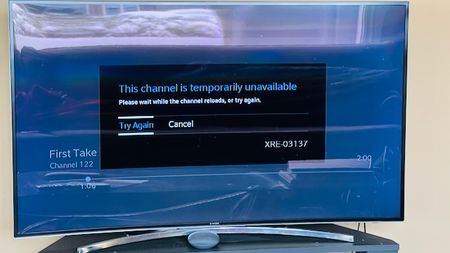
I have always had this issue, but disregarded it because I didn't watch too much TV. However, now that the Olympics are on, I've been watching much more often. The issue I'm experiencing is that every time I watch Helix TV, after a few minutes, the three dots appear on the screen as if it's loading something. After sometime, the error message shows up "This channel is temporarily unavailable". While this is happening, I can hear the sound of the channel in the background, and can change channels, but I can't see anything except the 3 dots. Clicking "Try Again" or "Cancel" does not do anything. Guide still works and the Helix button brings up the menu, but when anything is selected, it just shows the 3 dots loading. The only thing that fixes this is to unplug the box and plug it back in, but then after a few minutes the problem starts up again. I have tried changing HDMI cables, changing the Helix box from the old (Gen 1) to the more recent (Gen 2), but still am having the same problem. Please see the screenshot for a better understanding. Has anyone experienced this before, and if so, what was the solution?441Vues0like4Commentaires
Helix Tv App Samsung TV Issue
Has anyone on a new samsung tv recently have their Helix TV app show a black screen only when you try to access the app. I know it's not the TV I tried everything possible. Something is going on with the app on thr samsung tv. Anyone else having this issue? It caused me to miss the first period of the hockey game tonight and had to watch the rest on my phone.534Vues0like5Commentaires
O
I've had HELIX with GIGA speed for almost 3 years. So far, it's been pretty reliable but there are occasional interruptions and slowdowns. Certainly better than Illico. But over the last 2 months, I've been losing Internet or WiFi connections several times during the day. These are short disruptions...a minute or a few. Several times too the HELIX receivers can't connect to the gateway. But after a few minutes it's OK. It's become a real annoyance. So I called technical support last week. They told me right away that I have electromagnetic interference. Apparently, they have a tool that tells them this. Happens at fairly regular intervals not not exactly at predicable times and rarely overnight. But nothing has changed in my home. The gateway is still in the same place and nothing is blocking it. I haven't bought anything like a soundbar or smart TV or any new appliance. This problem has come out of nowhere. Maybe a neighbor? I live in brick a home and my neighbor's homes are all brick too. I have a hard time believing that's the cause. Anyone else have a similar problem? How do you go about finding the problem. The support guy said I could download the NetSpot app which I did. But I can't really figure out how this product works. Any one have experience with such a tool? If this continues, I'm going to Switch to Bell Fibre direct 3.0 Gbps.Résolu204Vues0like4Commentaires
No handshake between Illico 4K Ultra-HD PVR and Samsung Crystal UHD DU7100
I have had enough with videotron. I got on boxing day a new TV (Samsung Crystal UHD7100) and after setting it up, it discovered my videotron box an Illico 4K Ultra-HD PVR (Samsung VD940CJ). it worked fine while I kept on the TV, but after turning it off and back on again, the videotron signal went black, disconnecting the HDMI cable and letting the TV set discover again the cable box worked the first time, but after a cycle of off/ons the problems comes back, sometimes no image, sometimes no sound, and after trying everyhting posible, even after a hard reset on the tv set, nothing, nothing at all. If videotron doesn't allow the HDMI signal to be visible (maybe it thinks I'm connecting a recording device or something else) I will cancel the service. I've had enough. I followed step by step the recommendations in Handshake problem? | La Communauté Vidéotron - 27280 to no avail. Waste of time and lots of frustration.624Vues0like4CommentairesError when sending attached scam email
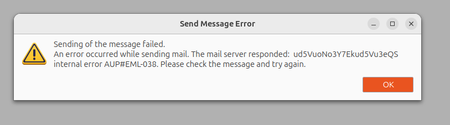
Hi, everytimes I want to report a scaming email to any scam email address, I send it as an attachment but then I get this error popup all the times. What is this error? Why am I getting this? How can I fix this? Or how can I report scam email to Videotron and to anywhere else (ex: [email protected])? P.S. : I am using Thunderbird 128.13.0esr (64-bit) email tool under Ubuntu 24.04124Vues0like0Commentaire