
Widgets du forum
Discussions récentes

Illico TV to Helix TV - A step backwards in some functionality
Hello, just switched to Helix from illico TV and although the Internet speeds are better, the Helix TV is not as good as illicoTv. 1. Illico TV when you were on a channel and something comes up where you can't continue to watch your show, you press record and it would record from start to end. On Helix TV it does not do that, it records at the point in time you pressed record. 2. On Helix TV you have the option to restart a show. However it does not allow you to fast forward, you have to press Go to Live and then rewind to reach the point in time that you want. If you went too far by mistake, you can't forward... You have to go live and then rewind. What the heck functionality is that!!?? 3. Illico TV had 1 hour buffer, Helix TV has 25 minutes. If you wanted to go back 30 minutes in time. You have to restart, go to live, then rewind 30 minutes. Can't fast forward, and what is annoying is that some shows you can fast forward so it's not consistent. I have 30 days to go back to illico. However can you stay on Helix internet and go back to Illico TV??? If they can put the 1 hour buffer, record the start of a show if you were on the channel from the beginning, fast forwarding in on demand on Helix TV that would already be a good step in the right direction.dannylam2408-10-2026Initiate2,9 kVues1like8Commentaires
Issue with HELIX Recording Playback
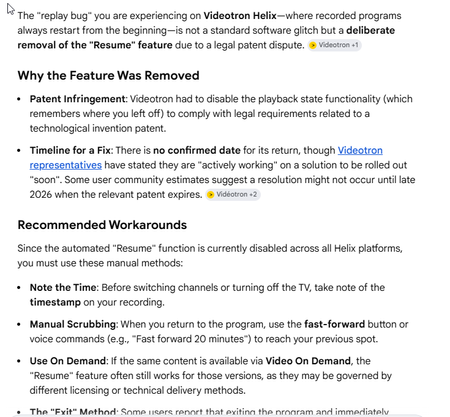
With Helix, do all recorded programs start from the beginning when you play them again? I could swear that if you played a recorded show and paused it after X minutes, changed the channel and then came back to watch the recorded program, it would start from where you paused, not from the beginning. It is not doing that anymore. Was there a firmware update that changed this? I know for a fact that it was not always like this because I would record a sporting event and play it while watching another live show by going back and forth between the two. When I went back to play the recorded sporting event, it would play from where I paused. But now it always starts from the beginning of the recording.rpridham07-10-2026Chevalier839Vues2likes7Commentaires
'Add on required' for Sportsnet+ live channel streams?
For years ive been signing into sportsnet's site to watch their live channels by using the 'sign in with tv provider' and using my videotron username and password As of 2 days ago, its now telling me i need an 'add on required' in order to watch their regular live channels. Curious if anyone else has been seeing this lately, or if its something going on with my account behind the scenes? ThanksvarunaX128-09-2026Squire193Vues0like3Commentaires
Sound goes off on some channels
Sometimes the sound suddenly cuts out on certain channels for about 60-90 seconds. It's happened on TSN, CTV, City, Sci-Fi and Comedy. All Bell Media channels. I know other Videotron subscribers who have the same problem with the same channels. I called my friend, who has Bell Fibe, during one of these sound outages to check if his sound was working and it was fine. This has been going on for over a year. What can be done?RésoluSnoogins07-09-2026Initiate5,2 kVues0like2Commentaires
problems adding HELIX TV to existing HELIX INTERNET account at competitive price
because we moved service addresses around the time of helix launch, we were aggressively convinced to switch to helix internet. it was new at the time and there were limited tv bundles. now we are trying to add helix tv services and after three calls with customer service and a visit to a videotron kiosk, no one is able to offer anything like the promotional bundle pricing i see on videotron.com or with bell. i even had one phone rep change my plan, add helix tv at a price we didnt agree upon, and was then unable to remove it. she promised me a call-back the next day, and when no one called i had to call in and explain the situation myself. none of the reps understood the notes the previous one had left, and none offered me the deal the original rep *thought* she was giving me which was clearly reflected in the notes. 9+ years with videotron and i think this is the worst customer experience ive had. if senior management pulled the recordings of these three calls they would be embarrassed. has anyone had a similar problem? more importantly, has anyone successfully added tv/built a bundle around an existing helix internet account?tehdee30-08-2026Initiate2 kVues0like1Commentaire
Recurring incorrect geolocation issue affecting multiple Videotron public IP ranges
Hello, I am experiencing a recurring geolocation issue affecting my Videotron Internet connection and multiple public IP addresses assigned to my account. All devices connected through my home Internet connection (computers, phones, tablets) are incorrectly geolocated by Google services to Qiddiya City / Saudi Arabia instead of Montreal, Canada. Symptoms include: Google Maps immediately placing my location in Saudi Arabia “Near me” searches returning Middle East results Incorrect regional results and geolocation across Google services time and date Important troubleshooting already completed: The issue affects ALL devices connected to my home Internet LTE/5G on the same phones works perfectly and immediately returns the correct location. IPv6 is disabled I use my own router (UDM-Pro) with the Videotron modem in bridge mode Most importantly: Changing the WAN/public IP temporarily resolves the issue, but after approximately 3-4 days the problem returns again. Example affected IPs: 135.19.220.105 184.162.107.94 This strongly suggests that there is an issue with the geolocation/routing information associated with certain Videotron IP ranges or upstream routing pools. This is clearly not: a browser issue a device issue a WiFi issue or a Google account issue Please escalate this issue to the appropriate network/networking-geolocation team and investigate: incorrect IP geolocation registration upstream routing/geolocation databases DHCP pool assignments possible incorrect registration of Videotron IP blocks with Google geolocation services At this point, the issue is recurring across multiple IP assignments and requires investigation from the network side. Thank you.laurentiu_state01-08-2026Initiate175Vues0like4CommentairesUpscaling and image quality
I just bought a 4K tv. My only complaint about the Samsung PVR is that I can't deactivate upscaling to 4K. In the device parameters, I can only choose auto/4K. This setting automatically upscale ALL channel to 4K and I can't my TV native upscaling capabilities. I would like all channels to display in their native resolution and I would let my TV handle the upscaling if I want to. Another problem (not related to the PVR) is the poor signal quality of a lot of channels. If I compare 1080p quality of the same show on Videotron or on a streaming service, Videotron signal is significantly worst. Not by a small margin! I can't comment on 4K content (there is not much on Videotron yet). - Does Videotron plan to add a "no upscaling" option to their PVR? - Does Videotron plan to improve signal quality on their 720p and 1080p by using better CODEC and/or increasing bandwidth on channels?RésoluSteveRodrigue30-07-2026Initiate9,7 kVues0like4CommentairesReset Cisco 8642HD to play over the air (OTA) broadcasts from my antenna
Hi! I have migrated from Illico to Helix. Of course, my Cisco 8642HD, now rendered 'obsolete', no longer does anything except that when I boot, it says "Cable disconnected... [bla bla bla]... Press OK to watch programs recorded on this terminal". What I would like to do is to connect my outdoor UHF antenna to it, so that I can: a) feed its HDMI output to my home theater (which does not have a coax in), and b) PVR (record) shows. My current antenna installation can pull in 30 HD Digital stations (TRUE HD, not the compressed stuff we get over cable). Is there a way to achieve this? I have searched all over the 'Net, asked Google, Bing, GPT, etc., and have come up with nothing but unhelpful (read erroneous) info. Thanks!AnimeTron26-07-2026Squire3,1 kVues0like7Commentaires
Helix Resume glitch
I have been calling Videotron support since December about an issue with the "resume" feature. I cannot watch 2 events at the same time (with 2 recorded) as the resume always goes back to the start of the recorded program. Illico did not require you to record 1 of the programs. You could just go between the 2 and it would resume properly. 2 or 8 programs were automatically being recorded. In any case, I have been trying to get info on when this would be fixed. No help at all. But I was told that Videotron uses Comcast Xfinity SW. Which I did not know. Turns out this is not a bug. I'm not sure which is more frustrating: Not having the primary feature for which I have Helix (recording sports) or no one at Videotron seemingly being aware of the issueUtsie1823-05-2026Initiate239Vues0like1Commentaire
Helix TV Issue "Channel Temporarily Unavailable"
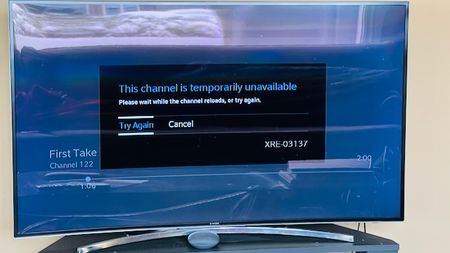
I have always had this issue, but disregarded it because I didn't watch too much TV. However, now that the Olympics are on, I've been watching much more often. The issue I'm experiencing is that every time I watch Helix TV, after a few minutes, the three dots appear on the screen as if it's loading something. After sometime, the error message shows up "This channel is temporarily unavailable". While this is happening, I can hear the sound of the channel in the background, and can change channels, but I can't see anything except the 3 dots. Clicking "Try Again" or "Cancel" does not do anything. Guide still works and the Helix button brings up the menu, but when anything is selected, it just shows the 3 dots loading. The only thing that fixes this is to unplug the box and plug it back in, but then after a few minutes the problem starts up again. I have tried changing HDMI cables, changing the Helix box from the old (Gen 1) to the more recent (Gen 2), but still am having the same problem. Please see the screenshot for a better understanding. Has anyone experienced this before, and if so, what was the solution?MrRoarke23-05-2026Initiate412Vues0like4CommentairesQuestions about Crave
Hi, I have a few questions about Crave. My understanding is that this is a streaming provider other than Videotron, right? If I want to watch something on Crave I have to logon to a Crave site, right? Are there requirements for Videotron members to subscribe to Crave? As Videotron members, do we get a discount subscribing to Crave? To people watching Crave, how is it? Not worth it because its mostly old new shows Takes months before something new shows up Kind of interesting to watch New stuffs on it but not as much as Netflix nor Amazon Prime Totally worth it Is there a way to see Crave's schedule to get an idea on what kind of show/movies they have? Personnaly, from the adds on Videotron TV mentionning Crave, I have seen only one show that I would be interesting to see. The others did not interest me.Browser-ice23-05-2026Samurai1,4 kVues0like4CommentairesProgram Guide - Guide button defaults to "All Channels"
Does this happen to anyone else? Is it normal? Equipment; Samsung HD PVR & X8 PVR Whenever, and every time, I turn off my PVRs, the Guide button selection reverts back "All Channels" from my previous selected option of "Favorite channels". Seems like it doesn't remember my selection. This means every time I turn back on my PVRs, I need to reselect my "Favorite Channels" under the Guide button. Very annoying.RésoluNoobaTron21-05-2026Initiate5,8 kVues0like3Commentaires
Helix Tv App Samsung TV Issue
Has anyone on a new samsung tv recently have their Helix TV app show a black screen only when you try to access the app. I know it's not the TV I tried everything possible. Something is going on with the app on thr samsung tv. Anyone else having this issue? It caused me to miss the first period of the hockey game tonight and had to watch the rest on my phone.kahlan20-05-2026Initiate503Vues0like5Commentaires
Étiquettes
- tv36 Publications
- channels35 Publications
- Helix tv19 Publications
- illico14 Publications
- remote11 Publications
- troubleshooting9 Publications
- apps7 Publications
- configuration6 Publications
- helix tv terminal5 Publications
- illico terminal4 Publications
Contenu Populaire
- 57 kVues1like6Commentaires
- 32 kVues1like14Commentaires
- 32 kVues2likes21Commentaires
club illico in English?
Résolu24 kVues0like2Commentaires- 23 kVues0like12Commentaires
 22 kVues1like20Commentaires
Netflix
Résolu21 kVues0like5CommentairesAMC??
Résolu20 kVues1like24Commentaires 17 kVues0like11Commentaires
- 14 kVues0like5Commentaires