helix tv
18 Sujets
Illico TV to Helix TV - A step backwards in some functionality
Hello, just switched to Helix from illico TV and although the Internet speeds are better, the Helix TV is not as good as illicoTv. 1. Illico TV when you were on a channel and something comes up where you can't continue to watch your show, you press record and it would record from start to end. On Helix TV it does not do that, it records at the point in time you pressed record. 2. On Helix TV you have the option to restart a show. However it does not allow you to fast forward, you have to press Go to Live and then rewind to reach the point in time that you want. If you went too far by mistake, you can't forward... You have to go live and then rewind. What the heck functionality is that!!?? 3. Illico TV had 1 hour buffer, Helix TV has 25 minutes. If you wanted to go back 30 minutes in time. You have to restart, go to live, then rewind 30 minutes. Can't fast forward, and what is annoying is that some shows you can fast forward so it's not consistent. I have 30 days to go back to illico. However can you stay on Helix internet and go back to Illico TV??? If they can put the 1 hour buffer, record the start of a show if you were on the channel from the beginning, fast forwarding in on demand on Helix TV that would already be a good step in the right direction.2,4 kVues1like7CommentairesHow to Delete a Helix Recording (Recordings menu or From the “For You” Section)
Hi there! We’ve noticed that some Helix users are having trouble deleting recordings, especially since the return of the resume watching features. Because there are now two different ways to delete a recording — either from the Recordings menu or directly from the For You section — here’s a clear summary of both methods. This should help you delete your content more easily. 😉 Deleting a recording Press the HELIX button on your voice remote to go to the main menu. Select Saved, then Recordings. Select the program to delete, then Delete and confirm. You can also select the X to the right of the title to delete. A confirmation message will appear. Select Delete Now and confirm. A confirmation message will appear. You can also use the D button on your remote to delete a single episode or a series, even during playback. Delete a recording from the “For You” section Some recently watched recordings can be deleted directly from the For You section. The steps differ slightly from deleting a recording using the Recordings menu. Episode of a series Select the series to open its info page. Press the down arrow to access Continue Watching. Highlight the episode you want to delete. Press the “i” button on the remote to display the options. Select Delete. Movie or single event Highlight the content you want to delete in the For You section. Press the center button on the remote to open the options. Select Delete. If you're still having trouble, feel free to write to us here — we're here to help! Samuel Community Manager23Vues0like0Commentaire
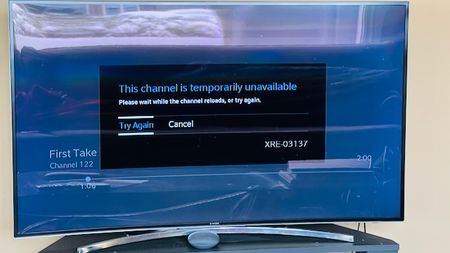
Helix TV Issue "Channel Temporarily Unavailable"
I have always had this issue, but disregarded it because I didn't watch too much TV. However, now that the Olympics are on, I've been watching much more often. The issue I'm experiencing is that every time I watch Helix TV, after a few minutes, the three dots appear on the screen as if it's loading something. After sometime, the error message shows up "This channel is temporarily unavailable". While this is happening, I can hear the sound of the channel in the background, and can change channels, but I can't see anything except the 3 dots. Clicking "Try Again" or "Cancel" does not do anything. Guide still works and the Helix button brings up the menu, but when anything is selected, it just shows the 3 dots loading. The only thing that fixes this is to unplug the box and plug it back in, but then after a few minutes the problem starts up again. I have tried changing HDMI cables, changing the Helix box from the old (Gen 1) to the more recent (Gen 2), but still am having the same problem. Please see the screenshot for a better understanding. Has anyone experienced this before, and if so, what was the solution?29Vues0like1Commentaire
Helix TV app Chromecast low picture quality
I don't know if this only happens to me. I noticed the picture quality when it's being casted from mobile app (e.g. from your phone or tablet via Helix TV app) is much lower than watching the same program via Helix TV box. The images (much easier to tell by comparing the fonts from the news program for example) are blur with fussy edges. Another thing I found is that, the picture quality is much better (still lower than the one from the TV box) for the first 1 min (~ 45 seconds actually) then starts to get blurring. At the beginning I suspected might be due to my Chromecast (internet) connection issues. But on the same device, all other Apps like Netflix, Amazon Prime video are casted crystal clear. Also, I tried on other Chromecast devices, including the newest edition with GoogleTV, and they are also behaving the same. Speaking of the other casting behavior like from Netflix is that normally the picture quality is lower for the the first minute or so then becomes much clear. It looks like taking sometime to buffer which is understandable. But the Helix casting behavior seems be doing the opposite way. So wondering have other Helix users seeing the same? Or is this a technical issue, hopefully not a business reason behind this ;-), already known to Videotron?Résolu6,1 kVues0like3CommentairesAchetons Québécois
Bonsoir, Dans le contexte Géopolitique que nous Vivons. Est-ce que Vidéotron (Québécor) envisage, concernant Helix de briser son contrat de locataire avec la compagnie Comcast et récupérer ses lettres de noblesse de solidarité , fièrté Québécoise créer en 1965 par Pierre Péladeau. Merci185Vues0like3Commentaires
Appli Helix TV: Appareil manquant pour casting
Suis-je le seul où lorsque je cherche à caster depuis l'application Helix TV, je ne vois pas l'ensemble des appareils qui supporte le casting de mon réseau? Dans mon cas, ma télé TCL QM7 (os android 12) et nvidia shield (depuis update 9.1) ne sont jamais inscrit dans la liste d'appareil. Par contre, je suis toujours en mesure de caster à mes Chromecast et vers ma barre de son JBL link bar (android TV). Je peux valider que les appareils sont bien configuré dans google home puisque je suis en mesure de caster depuis d'autres applications comme Youtube et Netflix. Idéalement, j'aimerais comprendre exactement ce que Helix fait comme validation avant d'afficher les appareils. Par exemple: Version du micrologiciel Chromecast Appareil avec une adresse IPV6 local Version DRM supporter J'utilise sans problème l'appli Helix TV depuis environ deux ans. J'ai remarqué la problématique lors de la mise à jour du shield à version 9.1 et lors de l'installation de la TCL QM7. L'ensemble des appareils sont connecté au même réseau WIFI. Mes équipements réseautiques sont composés du Helix Fi 2 et un pods. Merci,151Vues0like1Commentaire
Qualité 540p 30fps sur Hélix.tv (Web) ?
Avec une simple recherche on découvre rapidement que le service Web d'Hélix ne répond aucunement au standard de qualité que les utilisateurs recherche et le problème persiste depuis plusieurs années sans changements de la part de Videotron. Une inspection de la page web indique une qualité d'image de 540p @30fps... Sommes nous en 2025 ou en 2000?! -Problème de connexion internet? Non... -Paramètres du lecteur? Oui il est à maximale... Se problème va-t-il être pris en considération un jour ? Il est possible d'avoir une meilleur qualité d'image sur des site de streaming/piraté alors que nous payons pour se service, inacceptable... S'il s'agit d'un enjeu d'infrastructure (un Pc Desktop pourrait avoir des dizaines d'onglets avec des lecteurs d'ouvert en même temps et consommé d'énormes ressources par exemple...) alors à quand une solution pour limiter cette abus et débloquer une qualité de 1440p ou 2160p pour un service qu'on débourse. Une application offerte sur le windows store par exemple serait une solution. Débloquer le lecteur Web pour une qualité acceptable ou rendre l'application Hélix TV d'android/iOS sur windows est grandement attendu... Merci171Vues0like1Commentaire