router
38 Sujets
IPv6 et Helix en mode pont / IPv6 & Helix Bridge Mode
Ce sujet est revenu à plusieurs reprises au fil des années, avec des niveaux de résolution variables. Je pense que plusieurs clients — particulièrement ceux d’entre nous qui travaillent dans le domaine des technologies — attendent toujours une réponse claire et officielle de Vidéotron concernant la prise en charge d’IPv6 sur des routeurs et pare-feu gérés par le client. Pour quiconque dépasse une configuration résidentielle de base, la passerelle Helix n’est généralement pas utilisée comme routeur principal ou pare-feu en périphérie du réseau. Plusieurs clients utilisent plutôt des solutions plus avancées comme Unifi Gateway, pfSense, OPNsense, IPFire ou VyOS. Avec IPv4, tout fonctionne très bien lorsque le modem Helix est configuré en mode pont (bridge mode). Par contre, du côté d’IPv6, la situation demeure non résolue. Pendant un certain temps, Vidéotron offrait le 6rd comme solution de contournement, mais plusieurs utilisateurs ont rapporté des résultats inconsistants, ce qui explique peut-être pourquoi cette option a finalement été abandonnée. Nous voilà rendus en 2026, et il ne semble toujours pas y avoir de solution documentée ou officiellement supportée. Pourtant, une solution existe clairement sous une forme ou une autre, puisque la passerelle Helix est capable d’attribuer des adresses IPv6 lorsqu’elle fonctionne en mode routeur. La question est donc simple : pourquoi la configuration requise pour le mode pont n’est-elle pas documentée publiquement? TL;DR En 2026, comment un client utilisant une passerelle Helix en mode pont peut-il configurer IPv6 sur son propre routeur ou pare-feu? ---- This topic has come up several times over the years, with varying degrees of resolution. I think many customers—especially those of us in the tech industry—have been waiting for a clear and official response from Videotron regarding IPv6 support on client-managed border routers and firewalls. For anyone beyond the most basic home setup, the Helix gateway is often not used as the primary border router or firewall. Many customers rely on more advanced solutions such as Unifi Gateway, pfSense, OPNsense, IPFire, or VyOS. With IPv4, this works perfectly fine when the Helix modem is placed in bridge mode. IPv6, however, is still unresolved. There was a period when Videotron offered 6rd as a workaround, but many users reported inconsistent results, which may explain why it was eventually discontinued. Fast-forward to 2026, and there still does not appear to be a documented or supported solution. Yet one clearly exists in some form, since the Helix gateway is capable of provisioning IPv6 when operating in router mode. This raises a simple question: why is the required configuration for bridge mode not publicly documented? TL;DR In 2026, how can a customer using a Helix gateway in bridge mode configure IPv6 on their own firewall/router hardware?313Vues0like4CommentairesChanging DNS servers in Helix Fi
This question has been asked in 2 other threads on this forum in 2023 and 2025 with the only solutions being to either change the DNS setting on each device connected to the Helix gateway or to buy a router and connect to the gateway in bridged mode. I have a better suggestion: Videotron developers *finally* update the Helix Fi app by adding an "Edit" button on the DNS server page to allow paying customers to change it there. How hard can that be? We can edit other features on the gateway like the DMZ, so why not the DNS settings?? I get that the hardware runs on Comcast's Xfinity xFi platform which locks down advanced networking configurations to prioritize ecosystem integration, support simplicity, and security over user customization. In light of that, just add a check box next to a statement that says something like: "I understand that changing the default DNS settings may cause Vidéotron Helix services (including Helix TV, parental controls, and advanced security features) to malfunction or stop working entirely. I agree that Vidéotron is not responsible for any service disruptions caused by custom DNS configurations, and that Vidéotron technical support cannot assist in troubleshooting network issues arising from these changes. I assume full responsibility for managing my custom network settings." I would be willing to check that box!275Vues0like4Commentaires
Adresse IP
Je dois brancher une téléscope intelligent sur mon réseau wifi, cependant, il gère mal les adresses IP 10.x.x.x J'aurais donc besoin de lui assigner une adresse du range 192.168.x.x Je n'y arrive pas avec mon Gateway Helix, un appel au service technique n'a pas aidé. Est-ce que la seule solution est de me procurer un nouveau router qui gère ce range d'adresses? Si oui, fois en mode bridge est-ce que la tv fonctionnera toujours, doit-elle être reconfigurée? MerciRésolu612Vues0like3Commentaires
Improving VoIP Stability While Traveling – Stag VPN Experience
<p>Hey everyone,</p> <p> I wanted to share a quick tip for those who rely on VoIP or internet calling services while traveling or working remotely. I've been using <strong>Stag VPN</strong> recently to stabilize my internet connection during calls, especially over public or shared networks. </p> <p> Before using it, I often had call drops or jitter issues with my internet telephony setup. But with Stag VPN, the connection feels more stable and secure. It routes traffic efficiently and helps avoid ISP throttling or region-based disruptions. </p> <p> Anyone else here tried using a VPN for internet calling? Would love to hear your experience or other recommendations! </p> <p><strong>Tags:</strong> <em>#VoIP</em>, <em>#VPN</em>, <em>#StagVPN</em>, <em>#InternetCalling</em>, <em>#RemoteWork</em></p>214Vues0like1Commentaire
Access Windows PC de l'extérieur avec port-forwarding
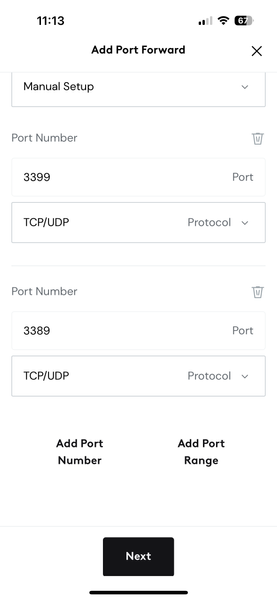
J'ai essayé de mettre en place un port-forwarding pour que de l'extérieur de chez moi, je puisse utiliser Windows Remote Desktop pour accéder à mon PC à la maison, mais en n'utilisant pas le port standard pour minimiser les resques de piratage. Ca a marché dans le passé, mais plus maintenant. Ci-bas une capture d'écran dand Helix Fi. C'est comme ça, non?303Vues0like2Commentaires