installation
3 Sujets
IPv6 et Helix en mode pont / IPv6 & Helix Bridge Mode
Ce sujet est revenu à plusieurs reprises au fil des années, avec des niveaux de résolution variables. Je pense que plusieurs clients — particulièrement ceux d’entre nous qui travaillent dans le domaine des technologies — attendent toujours une réponse claire et officielle de Vidéotron concernant la prise en charge d’IPv6 sur des routeurs et pare-feu gérés par le client. Pour quiconque dépasse une configuration résidentielle de base, la passerelle Helix n’est généralement pas utilisée comme routeur principal ou pare-feu en périphérie du réseau. Plusieurs clients utilisent plutôt des solutions plus avancées comme Unifi Gateway, pfSense, OPNsense, IPFire ou VyOS. Avec IPv4, tout fonctionne très bien lorsque le modem Helix est configuré en mode pont (bridge mode). Par contre, du côté d’IPv6, la situation demeure non résolue. Pendant un certain temps, Vidéotron offrait le 6rd comme solution de contournement, mais plusieurs utilisateurs ont rapporté des résultats inconsistants, ce qui explique peut-être pourquoi cette option a finalement été abandonnée. Nous voilà rendus en 2026, et il ne semble toujours pas y avoir de solution documentée ou officiellement supportée. Pourtant, une solution existe clairement sous une forme ou une autre, puisque la passerelle Helix est capable d’attribuer des adresses IPv6 lorsqu’elle fonctionne en mode routeur. La question est donc simple : pourquoi la configuration requise pour le mode pont n’est-elle pas documentée publiquement? TL;DR En 2026, comment un client utilisant une passerelle Helix en mode pont peut-il configurer IPv6 sur son propre routeur ou pare-feu? ---- This topic has come up several times over the years, with varying degrees of resolution. I think many customers—especially those of us in the tech industry—have been waiting for a clear and official response from Videotron regarding IPv6 support on client-managed border routers and firewalls. For anyone beyond the most basic home setup, the Helix gateway is often not used as the primary border router or firewall. Many customers rely on more advanced solutions such as Unifi Gateway, pfSense, OPNsense, IPFire, or VyOS. With IPv4, this works perfectly fine when the Helix modem is placed in bridge mode. IPv6, however, is still unresolved. There was a period when Videotron offered 6rd as a workaround, but many users reported inconsistent results, which may explain why it was eventually discontinued. Fast-forward to 2026, and there still does not appear to be a documented or supported solution. Yet one clearly exists in some form, since the Helix gateway is capable of provisioning IPv6 when operating in router mode. This raises a simple question: why is the required configuration for bridge mode not publicly documented? TL;DR In 2026, how can a customer using a Helix gateway in bridge mode configure IPv6 on their own firewall/router hardware?313Vues0like4Commentaires
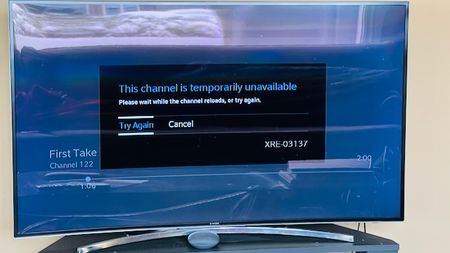
Helix TV Issue "Channel Temporarily Unavailable"
I have always had this issue, but disregarded it because I didn't watch too much TV. However, now that the Olympics are on, I've been watching much more often. The issue I'm experiencing is that every time I watch Helix TV, after a few minutes, the three dots appear on the screen as if it's loading something. After sometime, the error message shows up "This channel is temporarily unavailable". While this is happening, I can hear the sound of the channel in the background, and can change channels, but I can't see anything except the 3 dots. Clicking "Try Again" or "Cancel" does not do anything. Guide still works and the Helix button brings up the menu, but when anything is selected, it just shows the 3 dots loading. The only thing that fixes this is to unplug the box and plug it back in, but then after a few minutes the problem starts up again. I have tried changing HDMI cables, changing the Helix box from the old (Gen 1) to the more recent (Gen 2), but still am having the same problem. Please see the screenshot for a better understanding. Has anyone experienced this before, and if so, what was the solution?393Vues0like4Commentaires
Improving VoIP Stability While Traveling – Stag VPN Experience
<p>Hey everyone,</p> <p> I wanted to share a quick tip for those who rely on VoIP or internet calling services while traveling or working remotely. I've been using <strong>Stag VPN</strong> recently to stabilize my internet connection during calls, especially over public or shared networks. </p> <p> Before using it, I often had call drops or jitter issues with my internet telephony setup. But with Stag VPN, the connection feels more stable and secure. It routes traffic efficiently and helps avoid ISP throttling or region-based disruptions. </p> <p> Anyone else here tried using a VPN for internet calling? Would love to hear your experience or other recommendations! </p> <p><strong>Tags:</strong> <em>#VoIP</em>, <em>#VPN</em>, <em>#StagVPN</em>, <em>#InternetCalling</em>, <em>#RemoteWork</em></p>214Vues0like1Commentaire