helix tv terminal
5 Sujets
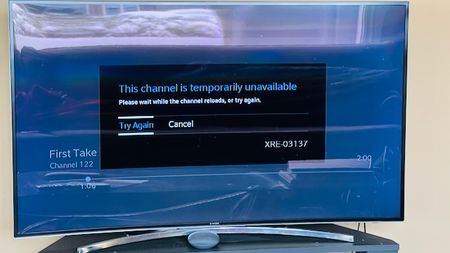
Helix TV Issue "Channel Temporarily Unavailable"
I have always had this issue, but disregarded it because I didn't watch too much TV. However, now that the Olympics are on, I've been watching much more often. The issue I'm experiencing is that every time I watch Helix TV, after a few minutes, the three dots appear on the screen as if it's loading something. After sometime, the error message shows up "This channel is temporarily unavailable". While this is happening, I can hear the sound of the channel in the background, and can change channels, but I can't see anything except the 3 dots. Clicking "Try Again" or "Cancel" does not do anything. Guide still works and the Helix button brings up the menu, but when anything is selected, it just shows the 3 dots loading. The only thing that fixes this is to unplug the box and plug it back in, but then after a few minutes the problem starts up again. I have tried changing HDMI cables, changing the Helix box from the old (Gen 1) to the more recent (Gen 2), but still am having the same problem. Please see the screenshot for a better understanding. Has anyone experienced this before, and if so, what was the solution?400Vues0like4Commentaires
Problème Hélix 4K et TV LG 65UF9500
Avant sur le système Illico, J’avais accès aux postes 4K mais maintenant c’est impossible depuis que j’ai migré vers Hélix. Le signal n’est plus accepté par ma télévision LG modèle 65UF9500 avec leur protocole HTCP 2.2 alors qu’il était avec le HTCP 2.1. LG et Videotron se renvoient la balle pour dire que le problème n’est pas de leur côté. Quelqu’un aurait une solution pour corriger ce problème ? Où puis-je formuler une plainte à Vidéotron? J’ai peur d’acheter une télévision de quelques K$ et d’avoir le même problème dans 5-6 ans.Résolu400Vues0like1Commentaire
Helix remote code rate?
I'm trying to use a IR transmitter to remotely (from internet) control my Helix terminal. The auto learn does not seems to work (read). Somewhere it suggest that the remote does not use the 38K code rate... Anybody has some knowleadge about the IR encoding rate of the Helix remote?299Vues0like4Commentaires
O
I've had HELIX with GIGA speed for almost 3 years. So far, it's been pretty reliable but there are occasional interruptions and slowdowns. Certainly better than Illico. But over the last 2 months, I've been losing Internet or WiFi connections several times during the day. These are short disruptions...a minute or a few. Several times too the HELIX receivers can't connect to the gateway. But after a few minutes it's OK. It's become a real annoyance. So I called technical support last week. They told me right away that I have electromagnetic interference. Apparently, they have a tool that tells them this. Happens at fairly regular intervals not not exactly at predicable times and rarely overnight. But nothing has changed in my home. The gateway is still in the same place and nothing is blocking it. I haven't bought anything like a soundbar or smart TV or any new appliance. This problem has come out of nowhere. Maybe a neighbor? I live in brick a home and my neighbor's homes are all brick too. I have a hard time believing that's the cause. Anyone else have a similar problem? How do you go about finding the problem. The support guy said I could download the NetSpot app which I did. But I can't really figure out how this product works. Any one have experience with such a tool? If this continues, I'm going to Switch to Bell Fibre direct 3.0 Gbps.Résolu199Vues0like4Commentaires