cybersecurity
11 Sujets
IPv6 et Helix en mode pont / IPv6 & Helix Bridge Mode
Ce sujet est revenu à plusieurs reprises au fil des années, avec des niveaux de résolution variables. Je pense que plusieurs clients — particulièrement ceux d’entre nous qui travaillent dans le domaine des technologies — attendent toujours une réponse claire et officielle de Vidéotron concernant la prise en charge d’IPv6 sur des routeurs et pare-feu gérés par le client. Pour quiconque dépasse une configuration résidentielle de base, la passerelle Helix n’est généralement pas utilisée comme routeur principal ou pare-feu en périphérie du réseau. Plusieurs clients utilisent plutôt des solutions plus avancées comme Unifi Gateway, pfSense, OPNsense, IPFire ou VyOS. Avec IPv4, tout fonctionne très bien lorsque le modem Helix est configuré en mode pont (bridge mode). Par contre, du côté d’IPv6, la situation demeure non résolue. Pendant un certain temps, Vidéotron offrait le 6rd comme solution de contournement, mais plusieurs utilisateurs ont rapporté des résultats inconsistants, ce qui explique peut-être pourquoi cette option a finalement été abandonnée. Nous voilà rendus en 2026, et il ne semble toujours pas y avoir de solution documentée ou officiellement supportée. Pourtant, une solution existe clairement sous une forme ou une autre, puisque la passerelle Helix est capable d’attribuer des adresses IPv6 lorsqu’elle fonctionne en mode routeur. La question est donc simple : pourquoi la configuration requise pour le mode pont n’est-elle pas documentée publiquement? TL;DR En 2026, comment un client utilisant une passerelle Helix en mode pont peut-il configurer IPv6 sur son propre routeur ou pare-feu? ---- This topic has come up several times over the years, with varying degrees of resolution. I think many customers—especially those of us in the tech industry—have been waiting for a clear and official response from Videotron regarding IPv6 support on client-managed border routers and firewalls. For anyone beyond the most basic home setup, the Helix gateway is often not used as the primary border router or firewall. Many customers rely on more advanced solutions such as Unifi Gateway, pfSense, OPNsense, IPFire, or VyOS. With IPv4, this works perfectly fine when the Helix modem is placed in bridge mode. IPv6, however, is still unresolved. There was a period when Videotron offered 6rd as a workaround, but many users reported inconsistent results, which may explain why it was eventually discontinued. Fast-forward to 2026, and there still does not appear to be a documented or supported solution. Yet one clearly exists in some form, since the Helix gateway is capable of provisioning IPv6 when operating in router mode. This raises a simple question: why is the required configuration for bridge mode not publicly documented? TL;DR In 2026, how can a customer using a Helix gateway in bridge mode configure IPv6 on their own firewall/router hardware?366Vues0like4CommentairesBlock incoming connections and ports - ZyXEL EMG2926-Q10A
Greetings, On the Videotron modem ZyXEL EMG2926-Q10A, does anyone know how to block all incoming traffic (from the internet to the modem) and how to lock all ports from incoming connections? When login into the modem via a web browser and the clicking on: Expert Mode > Configuration (left side of the screen) > Security > Firewall > Services > Add firewall rule , I cannot find the option for “incomming” traffic or “outgoing” traffic. There is only the “Source_IP_Address” which I suspect is the way to block the incomming connections to the modem. From my point of view, one would have to list all IP addresses as “source” by stating an IP address range such as 0.0.0.0 to 255.255.255.255. 1) Is that the way to block incoming connections to the router? 2) What is the correct way to type/state an IP address range in the EMG2926-Q10A? Regarding blocking the ports on the modem from incoming connections: 3) is that within: Expert Mode > Configuration > Security > Firewall > Services > Add firewall rule > SourcePortRange that ports 0 to 65535 have to be typed in to prevent people outside the network from scanning/using ports on the modem? Lastly, its not clear if creating a firewall rule (as stated above; “Add a firewall rule”) will create a rule that “allows” or “block” the traffic. 4) Does firewall rules block or allow traffic? Thanks in advance, Regards, B261Vues0like4Commentaires
When will Videotron deploy the November 1, 2025 Android Security Update?
CRITICAL: Network Signaling Issue Preventing Android Security Updates (Re: CVE-2025-48593 & S25/S20 FE) Hello, I am writing to inquire about the planned deployment timeline for the most recent Android Security Bulletin, dated November 1, 2025, and to report a severe, reproducible issue that appears to be preventing prompt security updates for Samsung devices on the Videotron network. My devices' security patch levels are significantly behind, which is unacceptable given the critical nature of the fixes included in monthly updates. I am specifically looking for information regarding the patch that includes the fix for the vulnerability identified as CVE-2025-48593. While the CVE status is currently Reserved on cve.org, its inclusion in the official bulletin emphasizes the need for a prompt update. For reference, the official sources for this update are: Google Android Security Bulletin - November 1, 2025: https://source.android.com/docs/security/bulletin/2025-11-01 CVE Record for CVE-2025-48593: https://www.cve.org/CVERecord?id=CVE-2025-48593 My Observations & Urgent Questions I have two Samsung devices exhibiting the same strange behavior, confirming a likely issue with the Videotron network: Device 1 (Samsung S20 FE): This device is currently stuck on the July 1, 2025 security patch. The industry standard is that the October 1st patch has already been released for this model. Device 2 (Samsung S25 Flagship): This newer, monthly-supported device was also stuck on the July 1, 2025 security patch. It only found and installed the October 1, 2025 patch after I manually removed Videotron as the network carrier in the phone's settings and then added it back. Based on this testing, I have two critical questions for the Videotron team: When is Videotron planning to roll out the November 1, 2025, security patch to its flagship devices? A four-month security gap is a serious security failure, and a clear, confirmed deployment date is required. Is there a known, systemic issue with how Videotron's network is signaling the latest available security patch to Samsung Android devices? Since two separate phones only received the available update after the network connection was forcibly reset (by removing/re-adding the carrier), this strongly suggests that the automatic, over-the-air (OTA) check triggered by the network is failing to register the update's availability. This affects all users who are simply waiting for the update notification. I urge the Videotron technical team to investigate this network-level signaling problem immediately. Thank you for your urgent attention to the security of your customers' devices. Thank you.Résolu240Vues0like1Commentaire
Improving VoIP Stability While Traveling – Stag VPN Experience
<p>Hey everyone,</p> <p> I wanted to share a quick tip for those who rely on VoIP or internet calling services while traveling or working remotely. I've been using <strong>Stag VPN</strong> recently to stabilize my internet connection during calls, especially over public or shared networks. </p> <p> Before using it, I often had call drops or jitter issues with my internet telephony setup. But with Stag VPN, the connection feels more stable and secure. It routes traffic efficiently and helps avoid ISP throttling or region-based disruptions. </p> <p> Anyone else here tried using a VPN for internet calling? Would love to hear your experience or other recommendations! </p> <p><strong>Tags:</strong> <em>#VoIP</em>, <em>#VPN</em>, <em>#StagVPN</em>, <em>#InternetCalling</em>, <em>#RemoteWork</em></p>224Vues0like1Commentaire
Access Windows PC de l'extérieur avec port-forwarding
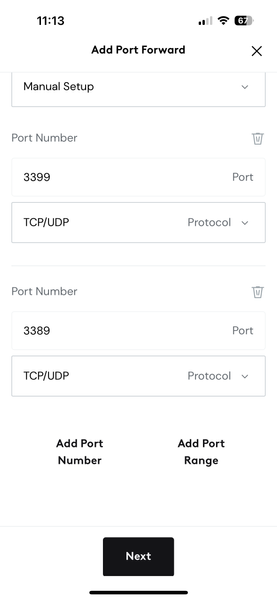
J'ai essayé de mettre en place un port-forwarding pour que de l'extérieur de chez moi, je puisse utiliser Windows Remote Desktop pour accéder à mon PC à la maison, mais en n'utilisant pas le port standard pour minimiser les resques de piratage. Ca a marché dans le passé, mais plus maintenant. Ci-bas une capture d'écran dand Helix Fi. C'est comme ça, non?320Vues0like2Commentaires