samsung
38 SujetsOn ouvre le Galaxy NOTE 8 de Samsung
Voici, en vidéo, ce qui se cache dans la boîte du fameux GALAXY NOTE 8 1. Le téléphone avec le stylet 2. Pince et pointes de stylet 3. Adaptateur d'alimentation USB 4. Prise micro-USB 5. Connecteur USB (USB C) 6. Câble USB 7. Éjecteur 8. Écouteurs AKG du groupe Harman 5,9 kVues7likes2Commentaires
Un téléphone pliant chez Samsung en 2019!?
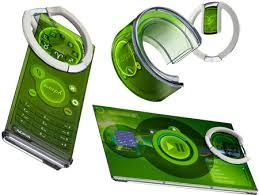
Ça fait déjà plus de dix ans que les compagnies de mobile tentent de nous vendre le concept d’un téléphone pliant. Je me rappelle encore les premiers concepts du Nokia Morph phone qui faisait rêver de science-fiction en nous présentant un mobile qui se transformait à la fois en tablette et en montre selon nos besoins. Mais finalement ce concept est peut-être plus proche de la réalité que l’on ne croyait. Samsung vient de faire un grand pas en avant dans cette direction en présentant à sa Developper Conference de San Francisco un appareil utilisant la technologie Infinity Flex Display. En effet, il s’agit du premier téléphone avec un écran pliant qui servira à la fois comme un mobile traditionnel avec un «Cover Display» de 4,58 pouces avec une définition de 1960×840 pixels et de tablette grâce au Infinity Flex Display qui lui offre un écran de 7,3 pouces d’une définition de 1536×2152 pixels. On anticipe la sortie commerciale de l’appareil pour 2019 bien que Samsung n’a rien annoncé de tel encore. Croyez-vous que les écrans flexibles soient la nouvelle technologie à la mode l’an prochain? Est-ce que ce nouvel appareil de Samsung vous intéresse? Pensez-vous à des applications plus innovantes de la technologie Infinity Flex Display? Sources : https://www.frandroid.com/marques/samsung/547110_samsung-infinity-flex-display-le-smartphone-pliable-enfin-devoile https://www.blogdumoderateur.com/samsung-telephone-ecran-pliable/11 kVues3likes12CommentairesConférence Samsung : dévoilement du Galaxy #Note9 avec son écran de 6.4po!
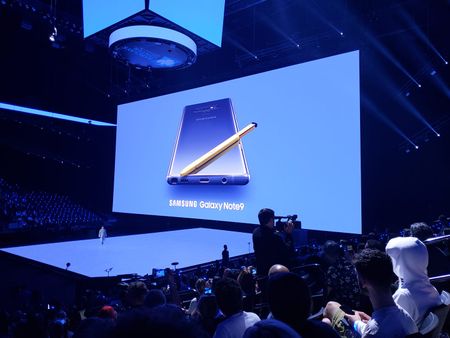
Voici donc le nouveau cellulaire de Samsung, le Galaxy Note9 ! Je suis en direct de la conférence de Samsung à New York. Je retiens notamment la belle amélioration du système DEX , qui permet de faire le lien entre le # Note9 et un écran. Ça transforme votre téléphone en ordinateur de table. Suivez-vous la conférence? Parlons-en ! Encore plus de détails sur mon fil Twitter: @Math_RoyRésolu8,5 kVues2likes4CommentairesContent transfer: Using manufacturers’ applications
From the following applications offering this feature, choose the one that matches your new device: Google Samsung Smart Switch Huawei Phone Clone Apple: Switching from Android to iPhone Apple: New iPhone device Pro tip Transferable content may vary from one company to the next. With some transfer methods, you may have to download the application on your old model or use transfer material. While most manufacturers provide the equipment you need, make sure you have everything you need before starting the transfer. Content transfer can be convenient when you haven’t synchronized your content in the cloud and are in a bit of a hurry. This will also help if you switch from Google to Apple. Most phone manufacturers thought to create an application enabling you to transfer your content from one device to the other to make things easier. Here’s a quick look at what these applications can do. Wireless transfers Wireless transfer is the most common option available to manufacturers thanks to Bluetooth, NFC and Wi-Fi Direct technologies. Generally, you just need to have the app on both phones and follow the instructions. You will first be asked to identify the old device and then the new one. You can then choose what you want to transfer to your new phone. Cloud transfers This is very similar to a Google or iCloud account transfer. It’s very effective when you want to transfer your data from an Apple product to an Android one. Make sure you’re connected to a Wi-Fi network or have sufficient data to proceed without exceeding your limit. USB cable transfers This method usually helps speed up the transfer. Most manufacturers provide an adaptor with their product to connect the devices together. The application will help you connect everything properly. As you can see, it’s getting easier to transfer data from one device to another. Even if you want to switch platforms or manufacturers, you can still find a solution that will allow you to keep what matters most to you! Read also: 10 things to do when you get your new phone3 kVues1like0Commentaire
5G sur Samsung S21 Plus
J'ai acheté un téléphone déverrouillé sur Walmart. Il s'agit d'un Samsung S21 Plus identifié comme 5G. Le réseau 5G n'arrive pas à se connecter du tout. Ça rester en réseau LTE. La carte Sim est compatible 5G et le réseau est actif car il est détecté sur un autre appareil. Avez-vous des solutions ?6,2 kVues1like3Commentaires
A little disappointed with my new Samsung 4K PVR
After playing with my new Samsung 4K PVR for several days, I decided to make notes. First, the good. This is a real nice piece of hardware. The video is excellent. The menus are sharp and fast. The response to any remote command seems instant. The guide is nice and the transport keys are very accurate. Even the recording capacity is fine and being able to record 8 channels at a time is great. But hardware is only as good as the software controlling it. Now, the bad. The firmware I am referring to is version 1.0.5.2. As far as PVRs go, I have tried many. Bell Satellite, TiVo, Starchoice, DTV, Channel Master Plus, Microsoft Ultimate TV and many more. They all have pluses and minuses and none are perfect. Here is a list of issues I have with the Videotron 4K PVR. 1 - Missing. When creating a new program to record, the option of recording only new episodes and not repeat episodes is not available. Because of this, the pvr records old episodes that I have already seen. Sometimes, the pvr records multiple copies of the same show. Restricting the frequency option makes it no better than a manual timer. 2 - Missing. The ability to see recording when the program is not in the Upcoming recordings list. This means I cannot delete a timer to a program that no longer airs. 3 - Missing. Show names in the List of Recorded Programs when there is only 1 show. They appear when there multiple shows in a folder. 4 - Guide. Inconsistent names. Some series show the Season # while some don't. 5 - Guide. After setting the Channel Filter to Favorite, after a while it jumps back to All Channels by itself. 6 - Guide. Sometimes when a program doesn't end or start on the hour or half hour, the yellow box jumps around back and forth and I can't select it. 7 - Bug. When forwarding in 4X, pressing the jump forward several times results in the picture freezing. The rest of my issues are with programming options. No English weather channel in the Basic Package. BBC Canada not in HD while Skynews is. Under certain circumstances paying twice for channels. And not being able to buy Superstations 1 at a time.Résolu22 kVues1like20Commentaires
5G Frequencies used by Videotron
Hi everyone, I have a Samsung Note 20 Ultra 5G that I bought in France. I understand that at this stage every country is using different 5G frequencies to deploy their own 5G network. As a result, I would like to know if anyone is aware of the 5G frequencies used by Videotron? And if my Samsung would be compatible with 5G network here in Canada? If it is not compatible, will a firmware update (Operator) solve the problem with frequency? Or I will have to change a new phone? Thanks a lot!!Résolu6,9 kVues1like2Commentaires