tv
21 SujetsHow to follow the Winter Games live
Where and when to watch the competitions With Videotron Helix TV, you can watch the competitions in French on the ICI TOU.TV app. You will also find the schedule for each discipline, when to tune in, and how to identify key moments to watch. Sports for all tastes There’s something for everyone: speed sports (on ice or snow), events that focus on precision and endurance, as well as disciplines where agility and technical mastery keep viewers on the edge of their seat. Whether you prefer solo performances or the intensity of team sports, you can watch skiing, snowboarding, sliding, and downhill events, as well as must-see face-offs between hockey and curling teams, among others. Immerse yourself in the Winter Games with Helix TV Discover the On Demand "Olympic Games" section As a Helix TV subscriber, go to the On Demand Trends section to discover the special environment of the Winter Olympic Games, bringing together linear channels and the ICI TOU. TV app. Quick tips to see it all with Helix Personalize your TV experience and get even more into the action. Relive a spectacular moment in slow motion Did you look away at the wrong time and miss a spectacular moment? Rewatch the phenomenal freestyle skiing or snowboarding trick, or the overtaking between the two best speed-skating athletes. With Helix, it's easy to relive memorable sequences in slow motion. Just press Pause, then the Fast Forward (>>) button. Follow all your sporting events thanks to the recording options To record a Winter Games event while you're away, schedule remote recording using the Helix TV app. Important: to capture every minute of athletes' performance and rankings, manually extend the recording time. It could also be that a hockey game extends beyond an allotted slot. Watch again from the beginning Did you get an important phone call and forget to pause the TV? The voice function of your remote control allows you to restart the sporting event from the beginning. Just say "Replay." This command is accessible throughout the event. However, note that fast-forward cannot be used with this catch-up mode. Cheer on your athletes at the Winter Games Experience the thrill of multiple high-level sports starting this Friday, February 6, 2026. Let the amateur in you enjoy every option offered by the ICI TOU.TV app via Helix TV. Your favourite athletes are waiting for you! Enjoy the Winter Games with Videotron. Frequently asked questions What sports are featured in the Winter Games? Multiple competitions will take place and this year, a new discipline is making its entrance: ski mountaineering. Alpine skiing Freestyle skiing Snowboarding Cross-country skiing Skeleton Ski jumping Short track speed skating Speed skating Figure skating Luge Ice hockey Biathlon Bobsleigh Nordic combined Curling How many countries and athletes are participating? A total of 93 countries will present more than 3,500 athletes at the Winter Games. Sixteen disciplines will be presented, as well as six Paralympic sports. What is the schedule for Canadian competitions? To follow the action on the Canadian side, keep in mind that the official schedule for the Winter Games begins on February 4, 2026, although the Opening Ceremony is on February 6. It will be airing according to the time zone of your device. To make it easier to find events that involve our athletes, check out the online schedule and filter by sport or discipline. Curling kicks things off on February 4, 2025. Also read : The magic behind the Helix voice remote Learn all about IPTV 11 healthy TV-watching habits to adopt151Vues0like0CommentaireThe fireplace is back on your screens!
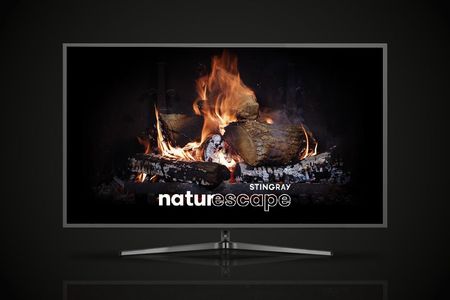
Enjoy the Stingray Naturescape fireplace from November 1, 2025, to December 31, 2025. From November 1 to 30, 2025, the fireplace is alight from 7 p.m. to midnight. From December 1 to 14, 2025, the fireplace is alight from 6 p.m. to midnight. From December 15 to 31, 2025, it’s on 24/7, adding some cozy vibes to your holiday festivities. How do I get the fireplace? Helix TV subscribers, just say “Fireplace” using your voice remote or go to channel 502 (HD) or 503 (4K). You can get your beloved fireplace outside the hours mentioned above through On Demand content. illico TV subscribers, go to channel 553 or 915 (4K). Want to get the fireplace on a screen other than your Helix TV terminal–connected TV? Learn how to use the Helix TV app on the screen of your choice. Music for the holidays We’re not done yet! Enjoy festive musical accompaniment with Stingray Music’s holiday channels. Find the best music of the season, including your favourite classics. With Helix, use the voice commands “Stingray Franco Fêtes” or “Stingray Holiday favourites” to access these dedicated music channels in the Stingray app and enjoy your favorite classics. This content is also available on the Helix TV app and the Stingray Music app. illico TV subscribers, go to channel 546 or 552. An ambiance for every season Access the Stingray Naturescape channel on demand whenever you want and pick an ambiance that fits your mood—idyllic beaches, rushing rivers, mountainscapes, seagoing creatures, soaring above the city . . . There’s even a limited-time crackling fireplace. To choose your ambiance, follow these steps with Helix: In the Helix menu, select the On demand category. Select the Channels tab, then the All Channels box. Scroll down until you reach the letter S, then press the right arrow on the remote to reach the Stingray Naturescape channel. Select the content you would like to watch. With illico TV, look for Stingray Naturecscape in channel 900’s Channels on Demand category. Enjoy! Read also: Add some magic to your holidays with Helix1,2 kVues0like0Commentaire